Magic Link Testing Without Polluting Real Inboxes
Stop using shared Gmail accounts for magic link tests. Learn how to test password-reset and magic-link authentication flows with ephemeral inboxes in your E2E tests.
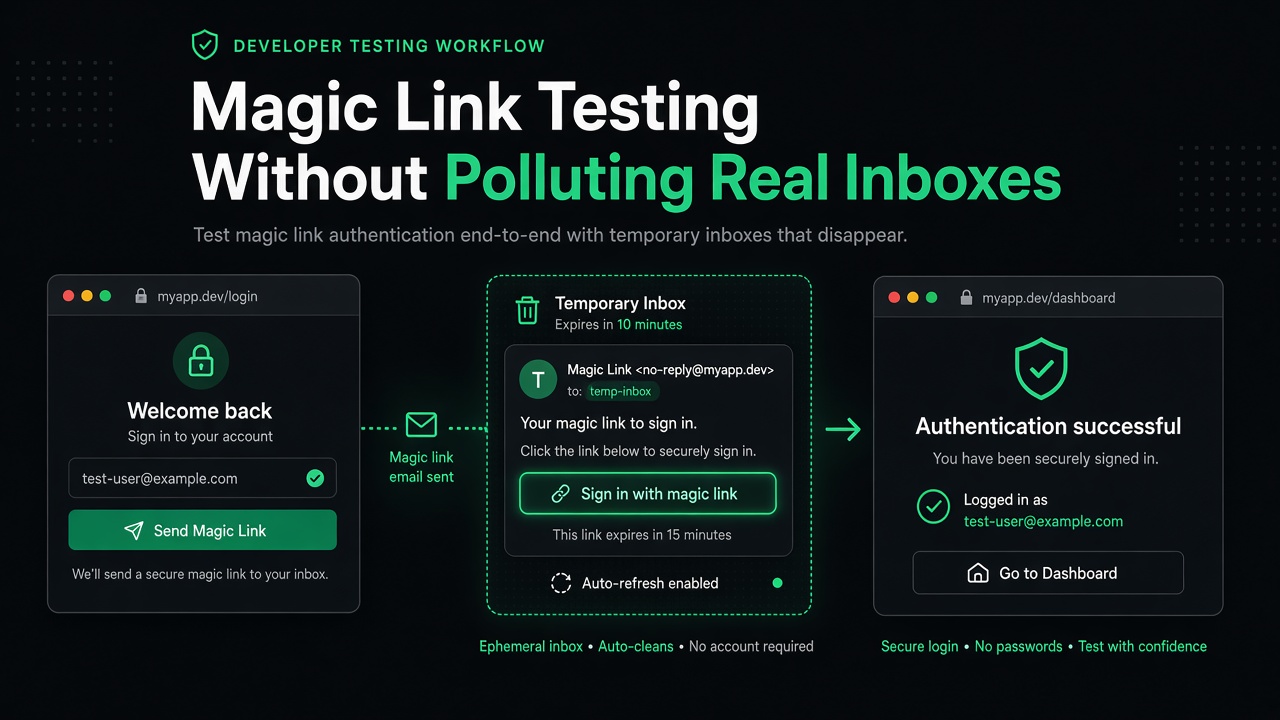
Testing magic link and password-reset flows in end-to-end tests often leads to messy workarounds: shared Gmail accounts that fill up with test emails, flaky IMAP parsing, or worse—mocking the entire email flow and losing confidence that the feature works.
A better approach uses ephemeral, per-test disposable inboxes that receive real email, extract the link automatically, and expire after the test completes.
The Problem with Real Inboxes in Tests
When your app sends magic links or password-reset URLs via email, your E2E tests need to:
- Receive real email to validate the full flow
- Extract the link from HTML or plain text
- Continue the browser flow by visiting the extracted URL
- Avoid state pollution between test runs
Traditional approaches create problems:
- Shared team Gmail/Outlook — Tests race for the same inbox; old emails confuse new tests
- IMAP polling libraries — Complex, slow, and brittle; parsing multipart MIME is error-prone
- Mocking the email service — Your tests pass, but production magic links break silently
- Manual testing only — Slows down iteration and misses regressions
Why Ephemeral Inboxes Solve This
Disposable email inboxes designed for testing give each test run a unique, temporary address. After the test, the inbox expires automatically—no cleanup required, no state leakage.
Key benefits for magic link testing:
- Unique inbox per test — Parallel test runs never interfere
- Link extraction built-in — No regex parsing of raw MIME
- REST API access — Simple polling from any language or CI environment
- Real email delivery — Tests the full SMTP flow, not a mock
- Auto-expiry — Old test data never piles up
Implementation Example
Here's how to test a magic link flow with OTPBox:
// Playwright/Puppeteer example: test magic link authentication
const { test, expect } = require('@playwright/test');

async function createInbox() {
  const response = await fetch('https://otpbox.app/api/inbox', {
    method: 'POST'
  });
  const data = await response.json();
  return { token: data.token, email: data.email };
}

async function getMagicLink(token, maxAttempts = 10) {
  for (let i = 0; i < maxAttempts; i++) {
    const response = await fetch(`https://otpbox.app/api/inbox/${token}/latest`);

    if (response.ok) {
      const data = await response.json();
      if (data.link) {
        return data.link;
      }
    }

    // Wait before retrying (email delivery typically takes 1-5 seconds)
    await new Promise(resolve => setTimeout(resolve, 3000));
  }

  throw new Error('Magic link not received after 30 seconds');
}

test('user can log in via magic link', async ({ page }) => {
  // 1. Create a disposable inbox for this test
  const { token, email } = await createInbox();
  console.log(`Test inbox: ${email}`);

  // 2. Start magic link flow in the app
  await page.goto('https://yourapp.com/login');
  await page.fill('input[name="email"]', email);
  await page.click('button:has-text("Send Magic Link")');

  await expect(page.locator('text=Check your email')).toBeVisible();

  // 3. Poll for the magic link
  console.log('Waiting for magic link...');
  const magicLink = await getMagicLink(token);
  console.log(`Received magic link: ${magicLink}`);

  // 4. Visit the magic link in the same browser session
  await page.goto(magicLink);

  // 5. Verify user is logged in
  await expect(page.locator('text=Dashboard')).toBeVisible();
  await expect(page.locator('text=Logout')).toBeVisible();
});
The critical parts:
- POST /api/inbox returns
{ email, token }as separate fields - GET /api/inbox/{token}/latest returns
{ link, otp, ... }with extracted magic link - Visit the link in the same browser context to continue the authenticated session
Alternative Strategies (And Their Trade-offs)
Before reaching for disposable email, consider these alternatives:
Local SMTP Catchers
Tools like Mailpit or MailHog run a local SMTP server that captures outgoing email during development and testing.
Pros: Fast, no external dependencies, full control
Cons: Requires setup/Docker in CI; not realistic for testing deliverability; manual link extraction
Public Temp Mail
Services like Mailinator or Guerrilla Mail offer free temporary email addresses.
Pros: Free, no signup
Cons: No official APIs; inboxes are public (anyone can read); often blacklisted by verification services
Paid Inbox APIs
Dedicated services like Mailtrap or Mailosaur provide email testing APIs with advanced features.
Pros: Robust APIs, team features, message search
Cons: Paid plans; overkill for simple magic link extraction
For most teams, a free disposable inbox service with link extraction offers the best balance: real email delivery, simple API, and no cost.
Pattern: Extract and Visit
The standard magic link test pattern:
#!/bin/bash
set -e

# 1. Create inbox
RESP=$(curl -s -X POST https://otpbox.app/api/inbox)
TOKEN=$(echo "$RESP" | jq -r '.token')
EMAIL=$(echo "$RESP" | jq -r '.email')

# 2. Trigger magic link from your app
curl -X POST https://yourapp.com/api/auth/magic-link \
  -H "Content-Type: application/json" \
  -d "{\"email\": \"${EMAIL}\"}"

# 3. Poll for the link
for i in {1..10}; do
  RESP=$(curl -s "https://otpbox.app/api/inbox/${TOKEN}/latest")
  LINK=$(echo "$RESP" | jq -r '.link // empty')

  if [ -n "$LINK" ] && [ "$LINK" != "null" ]; then
    echo "✓ Magic link received: $LINK"

    # 4. Open link in headless browser or validate token
    # Example: curl "$LINK" or visit in Playwright/Selenium
    exit 0
  fi

  echo "Waiting for magic link (attempt $i/10)..."
  sleep 3
done

echo "✗ Timeout: No magic link received"
exit 1
This pattern works for:
- Magic link authentication
- Password reset links
- Email verification links
- Unsubscribe URLs (if you need to test them)
Best Practices
When testing magic links in CI:
- One inbox per test run — Never reuse inboxes; parallel tests will collide
- Poll with reasonable timeouts — 30 seconds is usually enough; if delivery takes longer, something is wrong
- Test failure cases — Expired links, invalid tokens, rate limits
- Log the inbox email — Makes debugging failed tests much easier
- Don't commit tokens — Disposable inboxes are temporary by design; no need to store them
When to Use This Approach
Use ephemeral inboxes for magic link testing when:
- You run E2E tests in CI/CD that need real email delivery
- Your app sends magic links, password resets, or verification URLs
- You want to avoid shared test email accounts
- You need to test cross-device flows (send email, open link elsewhere)
Don't use this approach if you can get away with mocking or if your tests run entirely offline. For unit tests, mock the email service. For integration tests without browsers, this pattern still works—just validate the link format instead of visiting it.
Related Articles
- How to Test Email OTP Verification in CI — Learn how to test one-time codes alongside magic links
- Disposable Email vs Temp Mail for Verification Codes — Compare different temporary email solutions and their trade-offs
Resources
- OTPBox Home — Create a test inbox and try it manually
- OTPBox API Documentation — Full API reference for CI automation
Testing magic links doesn't require a dedicated Gmail account or complex IMAP libraries. With ephemeral inboxes, your tests receive real email, extract the link automatically, and clean up after themselves—leaving your test suite fast, reliable, and maintainable.