Disposable Email for CI OTP Testing
Use disposable email to test OTP flows in CI/CD pipelines. Learn practical patterns for parallel testing, isolation, and reliable verification code extraction.
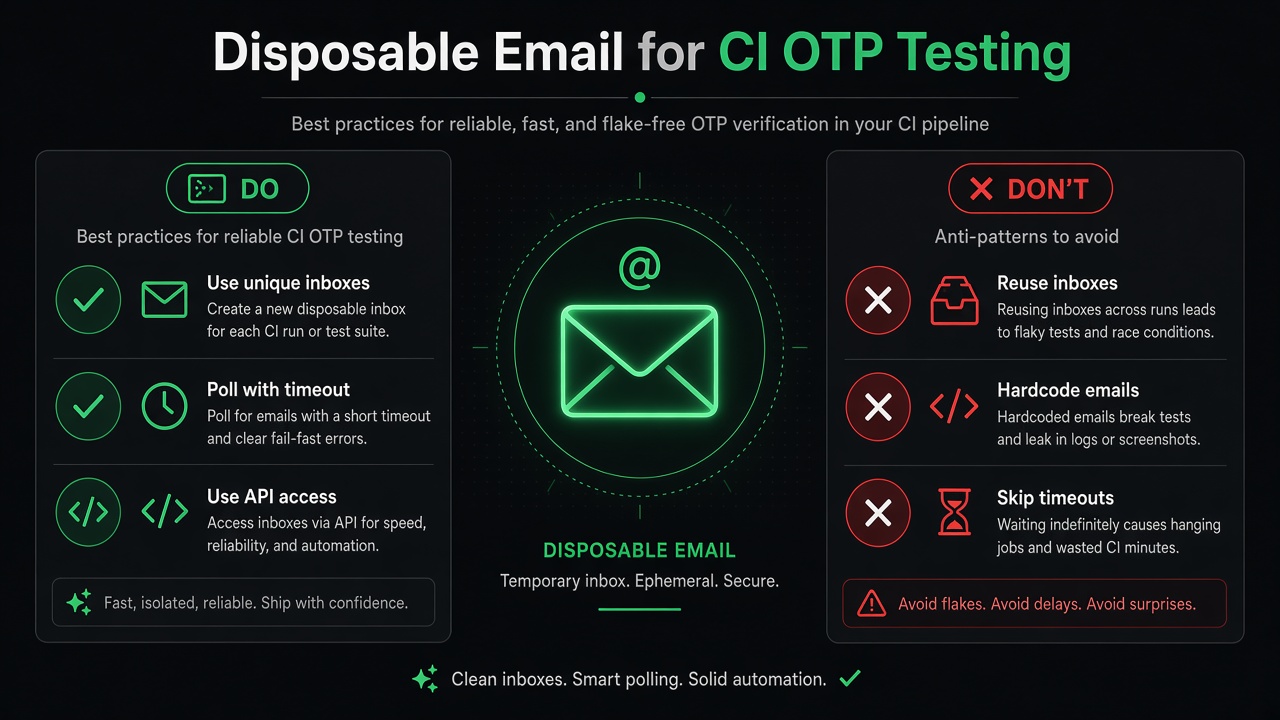
When your CI pipeline needs to test email verification flows, disposable email inboxes solve the problem of state pollution, parallel execution, and test reliability. Unlike shared Gmail accounts or local SMTP servers, disposable inboxes give each test run a unique address that expires automatically.
This guide shows practical patterns for using disposable email in CI, what to avoid, and when alternatives make more sense.
Why CI Needs Disposable Email
Testing OTP verification in continuous integration creates challenges that don't exist in local development:
- Parallel test runs — Multiple builds can't share the same inbox
- No manual intervention — You can't open Gmail and copy-paste codes
- State isolation — Old test emails shouldn't interfere with new ones
- Real delivery testing — Mocking skips SMTP, DNS, and deliverability issues
Traditional approaches fall short:
- Shared team inbox — Tests race for the same messages; cleanup is error-prone
- IMAP polling — Requires credentials, complex parsing, slow execution
- Local SMTP catchers — Great for dev, but add Docker/setup overhead in CI
- Mocking email service — Fast tests, but production email breaks go undetected
Disposable email services designed for testing provide instant inbox creation, REST API access, and built-in OTP extraction—no parsing required.
Do's and Don'ts: CI OTP Testing Checklist
✓ Do This
- Create a unique inbox per test run — Prevents state pollution and race conditions
- Poll for OTP with timeouts — Email typically arrives in 1-5 seconds; fail after 30 seconds
- Use the
/latestendpoint — Returns extracted OTP and link in JSON, no regex needed - Test failure paths too — Wrong codes, expired tokens, rate limits, invalid email formats
- Log the inbox email address — Makes debugging failed CI runs much easier
- Run tests in parallel safely — Each test gets its own inbox; no conflicts
- Extract both OTP and magic links — Some flows send one or both
✗ Don't Do This
- Reuse inboxes across tests — State leakage causes flaky failures
- Hardcode test email addresses — Always create inboxes dynamically via API
- Skip timeout handling — Infinite polling wastes CI minutes and hides real issues
- Ignore deliverability — Test with real email to catch SPF/DKIM problems early
- Parse raw email bodies — Use services with built-in extraction; maintain less code
- Commit inbox tokens — They're temporary and expire; no need to store them
Pattern: Create, Trigger, Poll, Verify
The standard workflow for testing OTP flows in CI:
#!/bin/bash
set -e

# 1. Create disposable inbox
echo "Creating test inbox..."
RESPONSE=$(curl -s -X POST https://otpbox.app/api/inbox)
TOKEN=$(echo "$RESPONSE" | jq -r '.token')
EMAIL=$(echo "$RESPONSE" | jq -r '.email')

echo "Test email: $EMAIL"

# 2. Trigger your app's verification flow
echo "Triggering signup..."
curl -X POST https://yourapp.com/api/signup \
  -H "Content-Type: application/json" \
  -d "{\"email\": \"${EMAIL}\", \"password\": \"Test1234!\"}"

# 3. Poll for OTP with timeout
echo "Waiting for OTP..."
MAX_ATTEMPTS=10
SLEEP_SECONDS=3

for i in $(seq 1 $MAX_ATTEMPTS); do
  RESPONSE=$(curl -s https://otpbox.app/api/inbox/${TOKEN}/latest)
  OTP=$(echo "$RESPONSE" | jq -r '.otp // empty')

  if [ -n "$OTP" ] && [ "$OTP" != "null" ]; then
    echo "✓ Received OTP: $OTP"

    # 4. Verify the code
    echo "Verifying OTP..."
    curl -X POST https://yourapp.com/api/verify \
      -H "Content-Type: application/json" \
      -d "{\"email\": \"${EMAIL}\", \"code\": \"${OTP}\"}"

    echo "✓ Test passed"
    exit 0
  fi

  echo "  Attempt $i/$MAX_ATTEMPTS - no message yet"
  sleep $SLEEP_SECONDS
done

echo "✗ Timeout: No OTP received after 30 seconds"
exit 1
Key points:
- POST
/api/inboxreturns{ email, token }as separate fields, nottoken@domain - Poll
/api/inbox/{token}/latest— returns{ otp, link, ... }when message arrives - Empty inbox returns 404 or error; check for
nullin your polling loop - 30-second timeout (10 attempts × 3 seconds) handles normal latency
JavaScript Example for Playwright/Cypress
Testing OTP flows in end-to-end test frameworks:
// Helper functions for OTPBox
async function createInbox() {
  const response = await fetch('https://otpbox.app/api/inbox', {
    method: 'POST'
  });
  const data = await response.json();
  return { email: data.email, token: data.token };
}

async function pollForOtp(token, maxAttempts = 10) {
  for (let i = 0; i < maxAttempts; i++) {
    const response = await fetch(
      `https://otpbox.app/api/inbox/${token}/latest`
    );

    if (response.ok) {
      const data = await response.json();
      if (data.otp) {
        return data.otp;
      }
    }

    // Wait 3 seconds before retrying
    await new Promise(resolve => setTimeout(resolve, 3000));
  }

  throw new Error('OTP not received after 30 seconds');
}

// Playwright test
test('user can verify email with OTP', async ({ page }) => {
  // 1. Create test inbox
  const { email, token } = await createInbox();
  console.log(`Test inbox: ${email}`);

  // 2. Sign up with disposable email
  await page.goto('https://yourapp.com/signup');
  await page.fill('input[name="email"]', email);
  await page.fill('input[name="password"]', 'Test1234!');
  await page.click('button[type="submit"]');

  // 3. Wait for verification page
  await page.waitForSelector('text=Enter verification code');

  // 4. Poll for OTP
  const otp = await pollForOtp(token);
  console.log(`Received OTP: ${otp}`);

  // 5. Enter code and verify
  await page.fill('input[name="code"]', otp);
  await page.click('button:has-text("Verify")');

  // 6. Confirm success
  await page.waitForSelector('text=Email verified');
});
This pattern works with Playwright, Puppeteer, Cypress, or any framework that can make HTTP requests alongside browser automation.
When to Use Disposable Email vs Alternatives
Use Disposable Email When:
- Testing in CI/CD — You need automated, parallel-safe email testing
- E2E tests require real delivery — Validates SMTP, DNS, email templates
- No infrastructure setup allowed — SaaS tools work without Docker or credentials
- Multiple concurrent test runs — Each gets its own inbox with no collisions
Use Alternatives When:
- Local development only — Mailpit or MailHog run locally, capture all mail, require no external services
- Offline testing — Mocking the email service works for unit tests without network calls
- Advanced debugging — Mailtrap or Mailosaur offer search, webhooks, and team features (paid)
- Public temp mail needed — Guerrilla Mail or Mailinator work for casual use, but lack APIs and privacy
For CI automation, disposable email with an API offers the best trade-off: real delivery, simple integration, and no cost.
Category Comparison: Disposable Email Services
Different types of email testing tools solve different problems:
| Category | Examples | Best For | API Access | CI-Friendly |
|---|---|---|---|---|
| OTP-First Services | OTPBox | CI automation, verification testing | Yes | Yes |
| Local SMTP Catchers | Mailpit, MailHog | Dev environments, offline testing | Limited | Requires setup |
| Public Temp Mail | Guerrilla Mail, Mailinator | Casual signups, one-time use | Unofficial | No |
| Paid Email APIs | Mailtrap, Mailosaur | Teams, advanced features | Yes | Yes |
Choose based on your constraints: free vs paid, local vs cloud, simple vs feature-rich.
Common Pitfalls and Fixes
Pitfall: Tests fail with "No OTP received"
Problem: Email delivery took longer than your timeout, or the service is down.
Fix:
- Check inbox creation succeeded: log the email address
- Verify your app actually sent email: check send logs
- Increase timeout to 45 seconds if latency is consistently high
- Add retry logic if the service occasionally has downtime
Pitfall: Parallel tests interfere with each other
Problem: Multiple test runs try to use the same inbox.
Fix:
- Always create a fresh inbox in each test's setup/before block
- Never reuse inbox tokens across tests or test files
- Use unique inbox per test, not per test suite
Pitfall: OTP extraction returns null
Problem: The email arrived, but the OTP wasn't detected.
Fix:
- Verify your email contains a numeric code (typically 4-8 digits)
- Check the
/latestresponse—doeslinkhave a value instead? - Some emails only send magic links, not OTPs; extract the link
Pitfall: Rate limits hit during test runs
Problem: Too many requests in a short time.
Fix:
- OTPBox allows 10 requests per hour per IP (as per docs)
- Don't poll faster than every 3 seconds
- Reuse the same inbox within a test; don't recreate unnecessarily
Related Articles
- How to Test Email OTP Verification in CI — Detailed guide for testing email verification flows in continuous integration
- Magic Link Testing Without Polluting Real Inboxes — Learn how to test magic link authentication flows with ephemeral inboxes
Resources
- OTPBox Home — Create a test inbox and try it manually
- OTPBox API Documentation — Full REST API reference for CI automation
Testing OTP flows in CI doesn't require complex IMAP libraries or shared Gmail accounts. With disposable email, each test gets a unique inbox, polls for the code via REST API, and cleans up automatically—keeping your test suite fast, reliable, and maintainable.